NEXVATO OSYOUR AI-POWERED BUSINESS WORKSPACE

Your business.
Working together.

Your customers, marketing, website, and AI.
One connected workspace to keep the next step moving.

nexvatoOSBUSINESS WORKSPACE
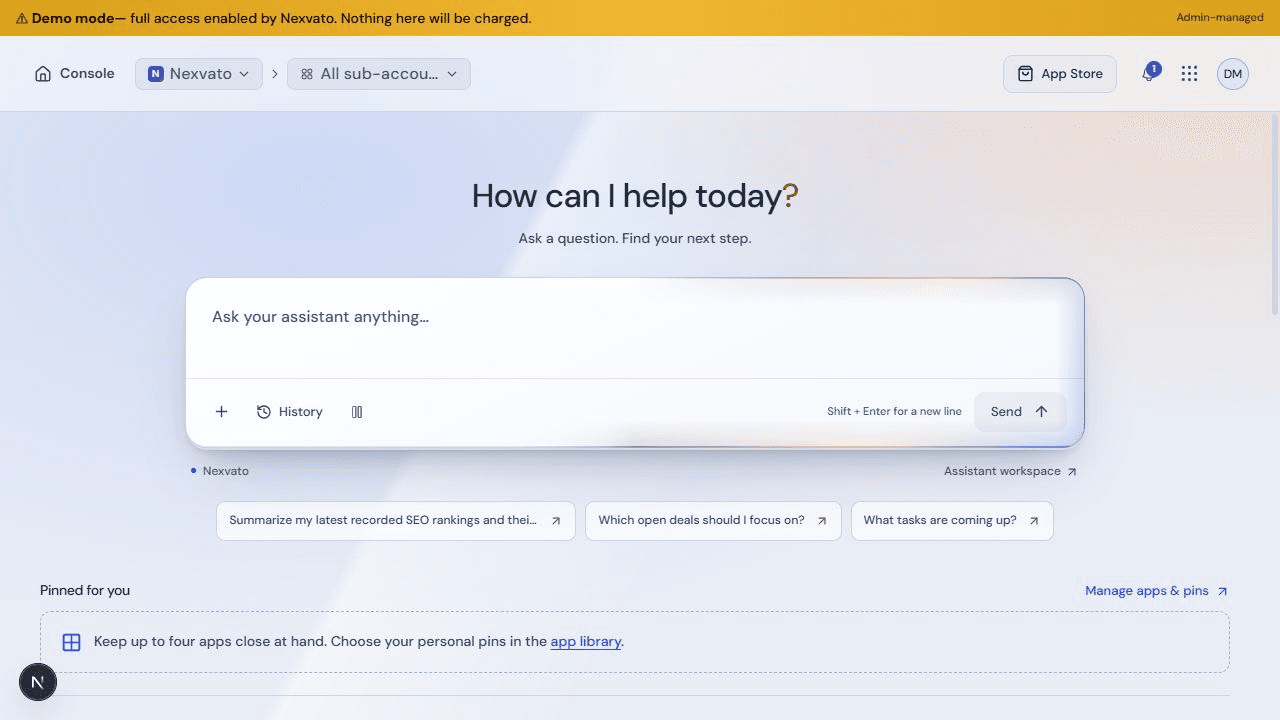
Nexvato OS Console with its AI assistant and personal app shortcuts
YOUR APPS. YOUR AI. ONE WORKSPACE.Explore what’s connected
Meet the next chapter of the Nexvato Business App.

01 / A CLEARER START TO YOUR DAY

Ask a question.
Find your next move.

Your assistant works with the information your account can access. Explore what changed, organize the work, and move from an answer to the right place in your business.

Your AI AssistantILLUSTRATIVE PRODUCT TOUR

Which leads need a follow-up?

Turn a question into a next step.

Review the contacts, open deals and tasks your account can access. Then open the relevant record or ask for help organizing the follow-up.

Contacts Deals Tasks
Context from your workspace Reports from supported data Permissions and action controls

02 / YOUR TOOLS, CONNECTED

One workspace.
Room to do more.

Choose the apps your business needs. Keep the tools you use most close at hand, with your assistant and customer context connected across the workspace.

KEEP THE RELATIONSHIP IN VIEW

Every customer.
A clear next step.

Keep contacts, conversations, notes, deals, and tasks together. Your team can see the relationship and what needs to happen next.

  • Contact records and conversation history
  • Sales pipelines and follow-up tasks
  • Shared activity and team visibility
Explore CRM
nexvato OSILLUSTRATIVE WORKSPACE
CRM / YOUR RELATIONSHIPS

Every next step, together.

New inquiryIn conversationNext step
HSHarbor StudioWebsite inquiry Conversation saved
NGNorth & GroveService consultation Team assigned
OCOak CollectiveFollow-up planned Task created
Contact → Conversation → Follow-up
Illustrative workspace · example content

UNDERSTAND YOUR VISIBILITY

See where you stand.
Know where to focus.

Explore recorded keyword rankings, backlinks, local search and website health. Bring connected Google reporting into the same workspace.

  • Rankings and dated visibility history
  • Local map grids and AI visibility
  • Technical health, backlinks and reports
Explore SEO
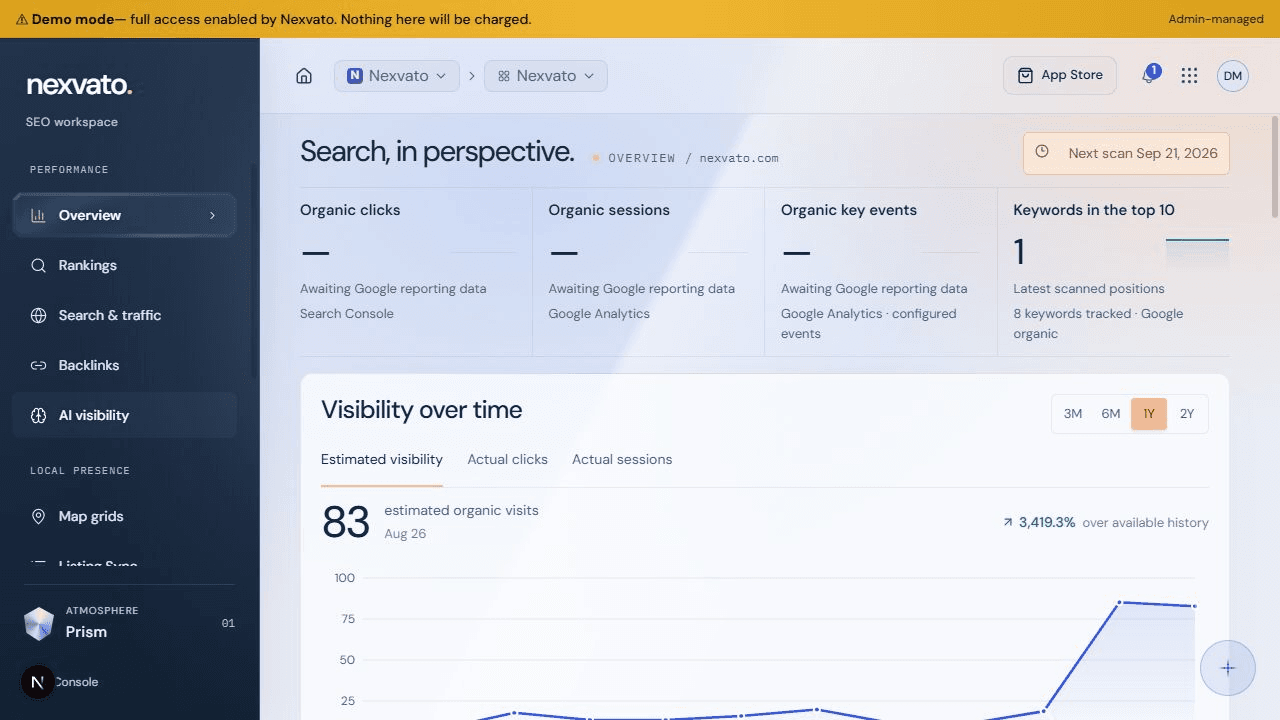
nexvatoOSBUSINESS WORKSPACE
Nexvato SEO workspace with recorded rankings and estimated visibility history
Product preview · capabilities depend on access and setup

CONNECT YOUR ONLINE BUSINESS

Your website.
Beyond launch day.

Keep website tools, content and health in view. Add an online store with its own product, order and fulfillment workspace when your business needs it.

  • Website content, domains and health
  • Optional product catalog and inventory
  • Orders and fulfillment in one workspace
Explore Website & Commerce
nexvato OSILLUSTRATIVE WORKSPACE
WEBSITE & COMMERCE

Your online business.

YOUR BUSINESSA place to
make it yours.
Explore the collection
Website Products Orders
Illustrative workspace · example content

HELP FOR YOUR CUSTOMERS

Answer the question.
Keep the conversation.

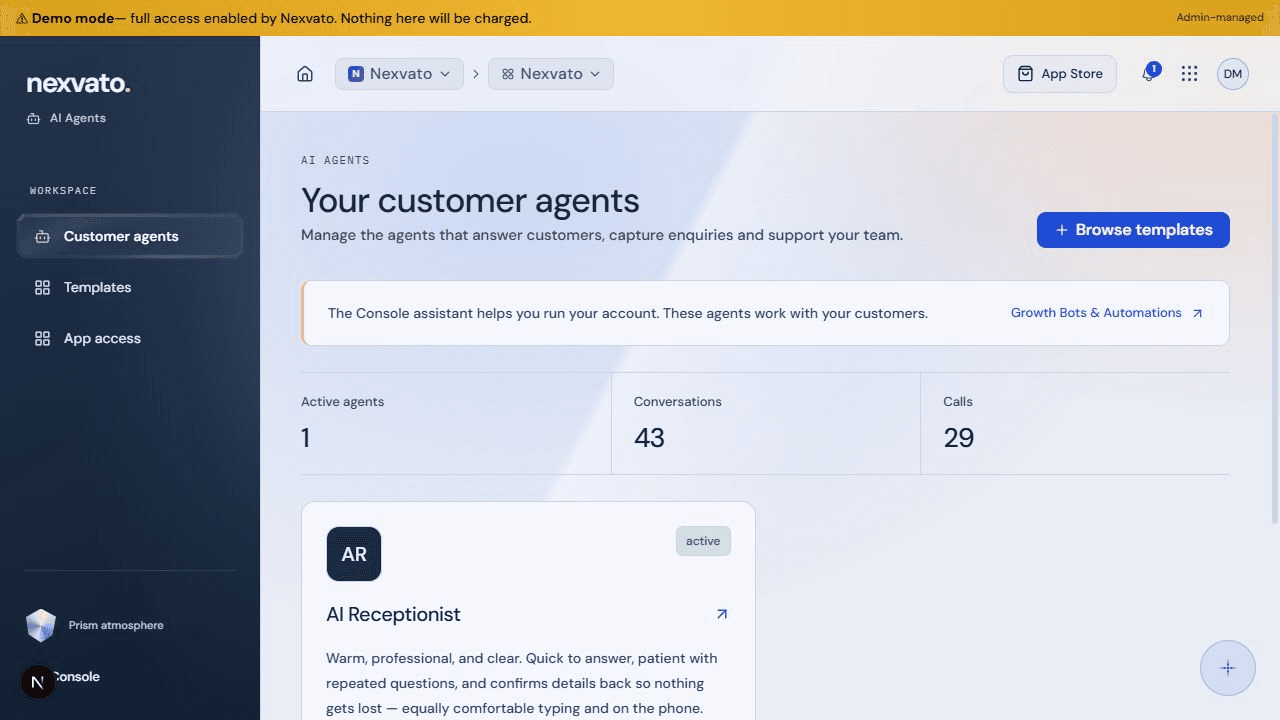
Configure customer-facing agents around your business knowledge. Support inquiries through website chat, voice and supported messaging channels.

  • Business-specific instructions and knowledge
  • Configured chat and voice channels
  • Conversation history and team handoffs
Explore AI Agents
nexvatoOSBUSINESS WORKSPACE
Nexvato customer AI Agents workspace with chat and voice channel information
Product preview · capabilities depend on access and setup

MAKE THE NEXT STEP HAPPEN

Less repeat work.
More follow-through.

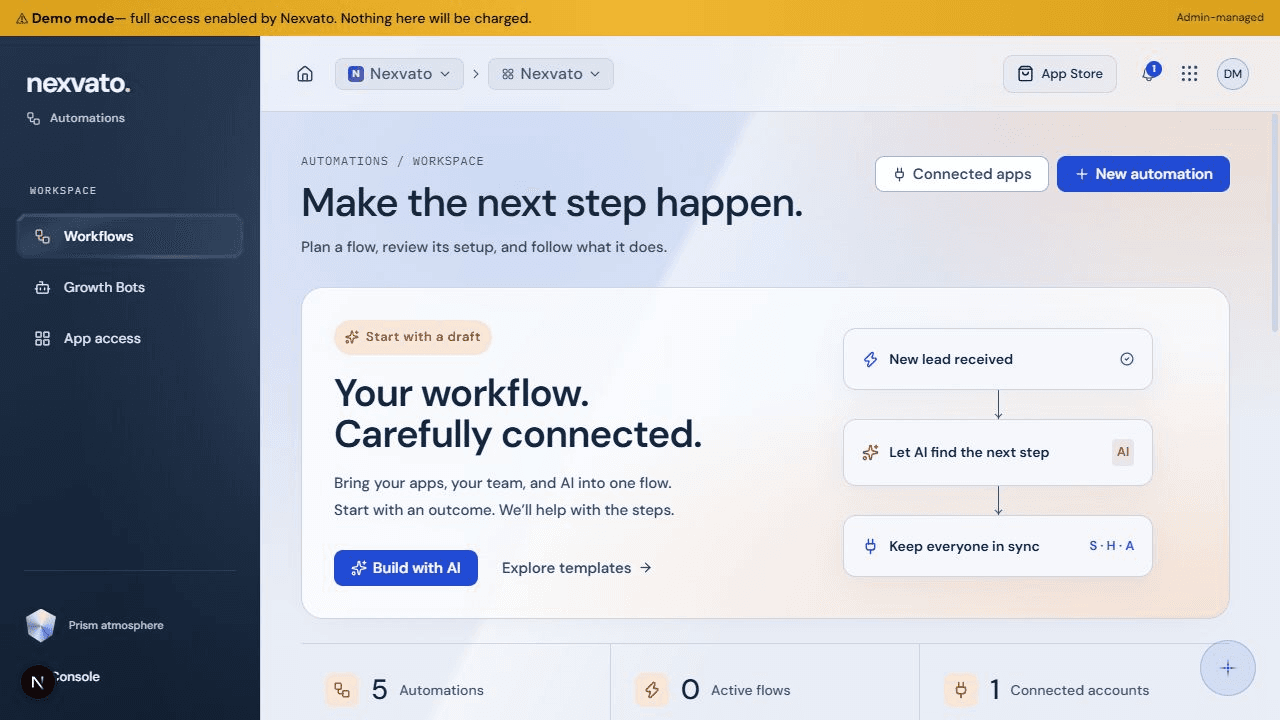
Connect triggers, conditions, waits and actions into a workflow. Use AI to help plan a draft, review its steps, and activate it when it is ready.

  • Visual workflows and campaign sequences
  • AI-assisted workflow drafts
  • Run history and connected actions
Explore Automations
nexvatoOSBUSINESS WORKSPACE
Nexvato Automations workspace for connected business workflows
Product preview · capabilities depend on access and setup

Social publishing

Limited release

Prepare content, review drafts, and manage supported social publishing where your channels and access are configured.

Explore Social

Reputation management

Limited release

Bring supported customer reviews and response tools into view. Availability depends on provider connections and setup.

Explore Reputation

Adding an app is separate from paid software, usage, and managed services. We help you choose and configure the right combination.

03 / SEE HOW THE PARTS CONNECT

One inquiry.
A connected journey.

Your customer’s story shouldn’t disappear between tools. Here’s one way a configured Nexvato OS workflow can keep it moving.

ONE INQUIRY. CONNECTED STEPS.01 / 04
CUSTOMER AI AGENT
ILLUSTRATIVE WORKFLOW

Hi, can you help me find the right service?

A real question. A useful conversation.

Start the conversation
01

CUSTOMER AI AGENT

An inquiry arrives.

A visitor starts a conversation with your configured website agent.

02

CRM / CONTACT

The details stay together.

Captured contact details and conversation history give your team useful context.

03

TASKS & AUTOMATIONS

The next step has an owner.

Create a follow-up task or plan a connected workflow around the way your team works.

04

ACTIVITY & REPORTS

You can see what happened.

Return to recorded activity and supported reports to review the work and plan what comes next.

04 / AUTOMATE THE FOLLOW-THROUGH

Build the steps.
Get back to work.

Turn repeat tasks into a deliberate workflow. Define what starts it, where it waits, and what happens next. AI can help you draft the plan; you review the details before activating it.

  • Connect supported business tools and actions
  • Plan email and supported messaging sequences
  • Review setup, run history, and next steps
Explore campaigns & workflows

Agents talk to customers.

Customer AI Agents respond through configured channels, using your business instructions and knowledge.

Your assistant works with you.

Ask questions, organize contacts and tasks, prepare reports, and plan supported actions in your workspace.

Workflows connect the steps.

Rules carry out configured sequences. Growth Bots support specialized content and background work where available.

05 / UNDERSTAND THE PROGRESS

See what changed.
Know what’s next.

Bring recorded search visibility, customer activity and supported reporting into focus. See the source and timing behind the numbers, then explore the work that matters.

nexvatoOSBUSINESS WORKSPACE
Nexvato SEO workspace with recorded rankings and estimated visibility history

Nexvato workspace preview · recorded and estimated data, not a promise of results.

Are we getting found?

Explore keyword rankings, local search, AI visibility, backlinks and technical health.

What needs our attention?

Review pipeline stages, customer conversations and upcoming follow-up tasks.

What can we learn?

Build reports from supported data, compare periods, and arrange scheduled delivery where configured.

Explore the SEO workspace

06 / THE SOFTWARE. THE PEOPLE BEHIND IT.

Use the tools.
Bring us in.

Run the workspace with your team, or bring Nexvato in where you need more help. We connect the software to a practical plan for your website, search visibility, campaigns and business workflows.

START WITH YOUR WEBSITE

Your next step.
A clearer picture.

Create your Nexvato OS account and open Website Health in the SEO workspace. Add your website, explore the audit, and keep the findings alongside your business tools.

Create your account

Choose “Create Account” on the sign-in screen. Existing OS users can sign in there too. App access and usage depend on your account.

01

Choose what fits.

Start with your goals, current tools, and the work you want to improve. We define the apps and services you need.

02

Connect your business.

Configure access, supported integrations and workflows. Put customer information and team responsibilities in the right places.

03

Make it your everyday.

Learn the workspace, agree on support, and refine the setup as your business grows.

Software capabilities and managed services are scoped separately. Your proposal defines access, setup, usage and ongoing support.

A FEW PRACTICAL ANSWERS

Before
you begin.

What is Nexvato OS?

Nexvato OS is our connected business workspace for customer relationships, AI assistants, marketing tools, websites and workflows. It is accessed through your browser; it does not replace your computer’s operating system. It is the next direction for the Nexvato Business App.

Can I choose the apps I need?

Yes. The App Store organizes the apps for your business, and you can keep up to four personal shortcuts on your Console. That is a shortcut limit, not an installation limit. App installation, paid software access, usage and managed services are separate.

How is the AI Assistant different from an AI Agent?

Your Console assistant helps you work with your account’s information and supported actions. Customer AI Agents handle configured customer conversations through chat, voice and supported messaging. Automations connect repeatable steps, while Growth Bots support specialized content and background work where available.

Can I use it with my team or multiple locations?

The platform supports team access and account/location context. What someone can view or do depends on their permissions, selected location, available apps and configured services. We help organize that setup around your business.

Does everything work as soon as I add an app?

Adding an app puts it in your workspace. Paid capabilities, phone or messaging channels, provider connections and publishing can require additional access, funding and setup. Social and Reputation currently have limited availability. We confirm the right scope before you start.

Can Nexvato manage the work for us?

Yes. Software and managed services are separate, so you can use the tools with your own team or bring Nexvato in for agreed website, SEO, marketing and automation work. We define the responsibilities, setup and ongoing support in your proposal.

What does Nexvato OS cost?

Cost depends on the software capabilities, usage and services your business needs. During a walkthrough we identify the right combination and explain what is included, what requires setup and any ongoing costs.

YOUR BUSINESS. MORE CONNECTED.

Meet your
next workspace.

Let’s explore what Nexvato OS could do for your business.